 K3Nova
For hosted Kimi K3
Use the official app, Kimi Work, Kimi Code or API route. Your machine does not load model weights, so local GPU and local VRAM are not the limiting factors.
Kimi K3 Guide
Compare Kimi K3 GPU, RAM, and VRAM requirements across hosted use, the k3nova.com workspace, and full-model self-hosting before you buy hardware.
Short answer: hosted Kimi K3 and the k3nova.com workspace do not need a local GPU; full-model self-hosting is a datacenter-scale inference project.
Workflow preview
Use the preview as a quick orientation, then continue into the direct answer, checklist and related pages for the concrete steps.
Compare Kimi K3 GPU, RAM, and VRAM requirements across hosted use, the k3nova.com workspace, and full-model self-hosting before you buy hardware. Short answer: hosted Kimi K3 and the k3nova.com workspace do not need a local GPU; full-model self-hosting is a datacenter-scale inference project.
Kimi K3 hardware planning is handled on this single page so visitors can get a focused answer, inspect the practical limits, and continue to the right Kimi K3 workflow without bouncing between duplicate pages.
| Area | Practical answer |
|---|---|
| Hosted Kimi K3 | No local GPU; use Kimi.com, Kimi Work, Kimi Code or the Kimi API with a current device and stable network |
| k3nova.com workspace | No local model weights; use a current browser, Node 20+ for local development, enough memory for media and long pages, and server-side model access when enabled |
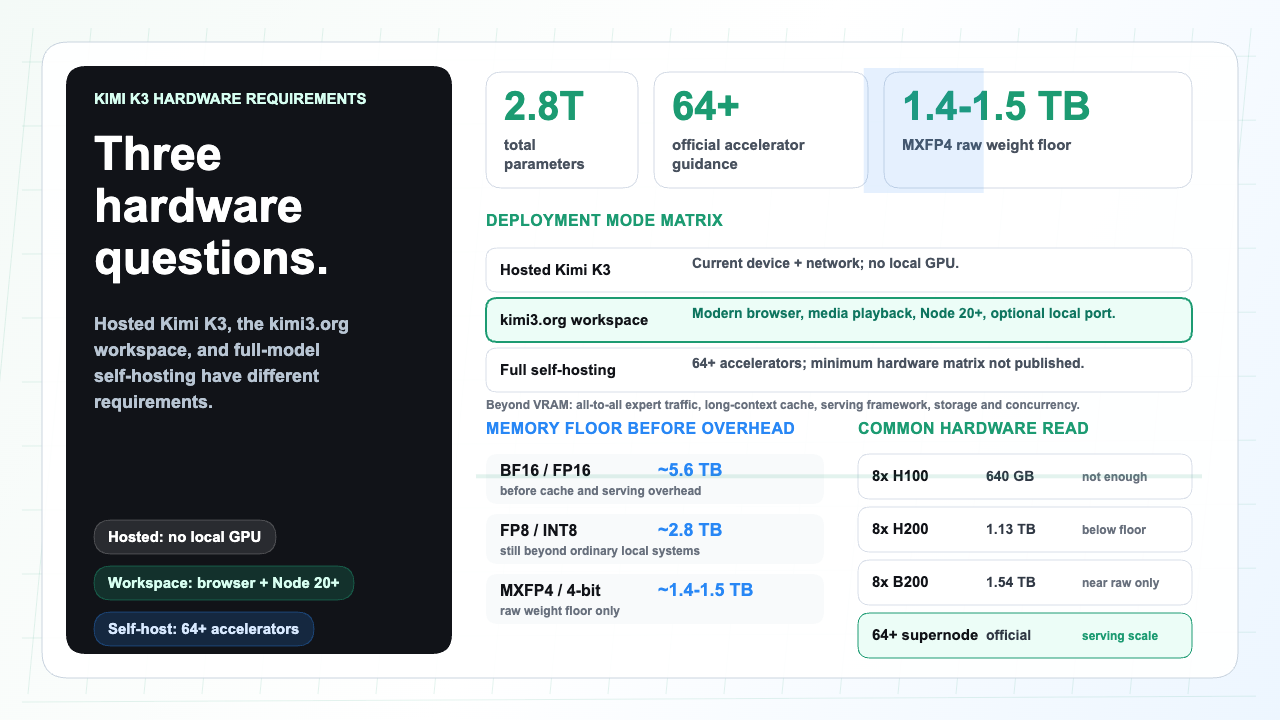
| Full-model self-hosting | Official production guidance is supernodes with 64+ accelerators; minimum GPU count and validated hardware matrix are not yet published |
| Raw weight floor | About 1.4-1.5 TB in MXFP4 or about 5.6 TB in BF16 before runtime overhead, long-context cache, activations, buffers and concurrency |
Kimi K3 hardware requirements depend on what you mean by run. Hosted use and the K3Nova workspace do not require local GPU, RAM, or VRAM beyond normal browser and server needs. Self-hosting the full Kimi K3 model is a large distributed inference project.
Use the official app, Kimi Work, Kimi Code or API route. Your machine does not load model weights, so local GPU and local VRAM are not the limiting factors.
A current browser, stable memory, video playback, Node 20+ for local development, and server-side model access are the practical requirements.
Treat Kimi K3 as cluster software. The official recommendation is supernode configurations with 64 or more accelerators; a minimum GPU count has not been published.
Do not buy a consumer GPU just to use K3Nova or hosted Kimi K3. Use the workspace locally, then evaluate full-model serving only with published artifacts and cluster tests.
| Mode | What runs locally | Practical requirement | Main limit |
|---|---|---|---|
| Kimi.com, Kimi Work, Kimi Code or Kimi API | Browser, desktop client or terminal client only | Current device, stable network, account or API access | Network latency, quota, request size and provider availability |
| k3nova.com public workspace | Static page, browser UI, local assets and optional local development server | Modern browser; Node 20+ and a free local port for development; no local GPU | Browser memory, media loading, large pasted content and server-side configuration |
| Self-hosted full Kimi K3 model | Model weights, routing, cache, serving runtime and distributed scheduler | Official production guidance: 64+ accelerators in a high-bandwidth supernode; exact minimum not published | Aggregate accelerator memory, all-to-all expert traffic, cache design and concurrency |
| Future community ports | Partial weights with CPU, RAM or NVMe assistance | Wait for released weights, loader support and reproducible reports | Throughput, format support and quality risk |
| Precision or format | Raw weight estimate | What it means |
|---|---|---|
| BF16 or FP16 | About 5.6 TB | Useful as a scale reference; not a realistic desktop target |
| FP8 or INT8 | About 2.8 TB | Still beyond ordinary workstations before runtime overhead |
| MXFP4 / 4-bit raw arithmetic | About 1.4 TB; about 1.5 TB when microscaling overhead is counted | This is only the weight floor, not the full serving requirement |
| Aggressive 2-bit thought experiment | About 0.7 TB | Not an official Kimi K3 release format; quality and kernel support would need proof |
| Configuration | Capacity reading | Practical conclusion |
|---|---|---|
| Consumer GPU, 24-48 GB VRAM | Far below the full-model raw-weight floor | Use hosted Kimi K3 or smaller local models; do not plan full K3 here |
| High-memory Mac or CPU-only workstation | Unified memory can hold large files but lacks the intended accelerator fabric | Fine for browser/API use and experiments, not full-speed Kimi K3 self-hosting |
| 8x H100 80 GB | 640 GB aggregate VRAM | Not enough for full MXFP4 weights with headroom |
| 8x H200 141 GB | About 1.13 TB aggregate VRAM | Still below the 1.4-1.5 TB raw-weight floor before overhead |
| 8x B200 192 GB | About 1.54 TB aggregate VRAM | Near the raw-weight floor but leaves little room and does not satisfy the 64+ accelerator production guidance |
| 64+ accelerator supernode | Matches the only official serving-scale recommendation | Best reading today for production-class Kimi K3 self-hosting until Moonshot publishes a hardware matrix |
| Factor | Why it matters | Planning note |
|---|---|---|
| Interconnect | MoE experts live across devices and require repeated dispatch and combine traffic | Prefer a high-bandwidth scale-up domain rather than loosely linked small GPU islands |
| Context and cache | The 1M context window changes cache pressure even with KDA reducing some growth | Measure actual prompt length, output length and cache hit rate |
| Concurrency | Sparse MoE serving needs enough tokens to keep experts busy | Test full-context multi-user load on rented cluster capacity first |
| Serving framework | KDA and 896-expert routing need framework support | Treat generic loaders as pending until they publish K3 support |
Practical answer: do not buy workstation GPUs for K3Nova or hosted Kimi K3. For full-model self-hosting, wait for weights, loader support, and a cloud-cluster test.
Hosted Kimi K3, the K3Nova workspace, and full-model self-hosting need different hardware answers. Browser/API use stays light; self-hosting needs accelerator memory, fast interconnect, serving software, and operations.
Moonshot lists 2.8T parameters, 896 experts with 16 active per token, 1M context, MXFP4 weights, and 64+ accelerator production guidance. A consumer hardware matrix has not been published.
Raw MXFP4 weights land around 1.4-1.5 TB before cache, activations, buffers, routing state, and concurrency. BF16 is about 5.6 TB, so ordinary desktop VRAM is not close.
Sparse routing lowers per-token compute, but inactive experts still need storage and fast access. The full Kimi K3 checkpoint does not become a small local model.
MoE serving depends on expert traffic across devices. The 64+ accelerator note is about throughput inside a high-bandwidth communication domain, not just total VRAM.
The 1M context window changes cache pressure. Before buying hardware, test prompt length, output length, cache hit rate, and concurrency on rented cluster capacity.
Use this guide with the live Kimi K3 workspace and pricing page. Start with a real task, prepare the input, inspect the result, and decide whether the plan and workflow match the work.
Kimi K3 keeps the workflow focused on practical tasks: prepare the input, run a realistic prompt, inspect the result, and choose the next step.
For a better trial, bring real constraints. A good prompt includes the source material, the output format, the role of the reader, and one follow-up question. This lets the workspace prove whether it can preserve context and produce a result that is ready to use.
Decide first whether the job is hosted use, K3Nova workspace setup, or full-model self-hosting. That single choice changes the Kimi K3 hardware requirements from ordinary browser/server resources to cluster-scale GPU, RAM, VRAM, interconnect, storage, and serving work.
Use the facts below as the purchase gate. If the plan depends on full-model local serving, wait for published weights, loader support, checksums, and a reproducible benchmark before buying hardware.
For follow-up reading, continue to How to Run Kimi K3 Locally, Kimi K3 Context Window, Kimi K3 Local Deployment, Kimi K3 FAQ.
A laptop can run the K3Nova workspace locally for development, but it cannot self-host the full Kimi K3 model.
The K3Nova workspace does not need a local GPU. Full-model self-hosting should be treated as cluster-scale until a validated hardware matrix is published.
Hosted use and the K3Nova workspace need ordinary browser and server resources. Full-model self-hosting starts from a raw weight floor measured around terabytes before runtime overhead.
Use Ollama only after a compatible Kimi K3 artifact, license, manifest, checksum, memory estimate, and runtime support are verified.
Official sources anchor the hard facts; third-party notes are included only where they clarify hardware estimates.