 K3Nova
Name the mode first
Decide whether you are using hosted Kimi, running the K3Nova web workspace, testing a client against a hosted endpoint, or self-hosting model weights.
Hardware planning
A Kimi K3 hardware checklist for hosted use, K3Nova workspace use, RTX 6000 Ada experiments, and full-model self-hosting.
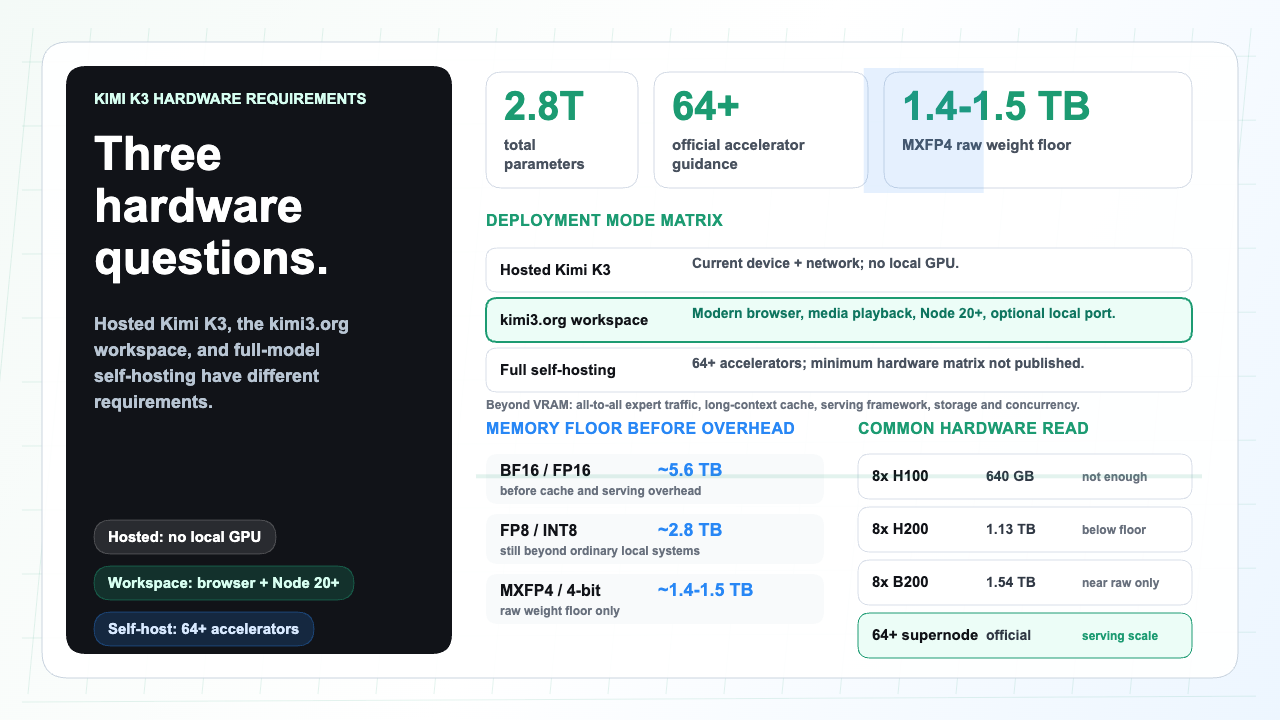
For hosted Kimi K3, Kimi Code, Kimi Work, or K3Nova, you do not need a local GPU to use the model. You need a current browser or CLI, stable network, and authorized model access.
For full Kimi K3 self-hosting, treat the project as cluster-scale. The official model data lists 2.8T total parameters, MXFP4 weights, 896 experts, 16 selected experts per token, and a 1M-token context window. A single workstation GPU is not the full-model answer.
Use this section to keep the next step practical before you touch accounts, files, infrastructure, or hardware.
| Check | Look for | Why it matters |
|---|---|---|
| Read the official source | Start with the model card, help center, docs, or official product page before trusting summaries. | Model names, limits, and prices change. |
| Name the path | Decide whether you need a hosted app, API call, local client, or full self-managed deployment. | Different paths have different costs and account boundaries. |
| Check the boundary | Keep login, payment, API keys, private files, and account settings on the official surface. | A public guide should help you choose, not handle sensitive actions. |
| Keep evidence | Save the source link, date, version, and practical next step that shaped your decision. | This makes later review easier for a team. |
| Mode | Local hardware | Main limit |
|---|---|---|
| Kimi web, Kimi Code, Kimi Work, or K3Nova | Current device and stable network | Account, quota, endpoint, and request size |
| Local K3Nova development | Node runtime, browser, and enough RAM for assets | Server config and local port conflicts |
| One RTX 6000 Ada | 48 GB VRAM workstation GPU | Useful for smaller local models, not full Kimi K3 |
| Full self-hosting | Distributed accelerator cluster | Weight memory, context cache, interconnect, and throughput |
Decide whether you are using hosted Kimi, running the K3Nova web workspace, testing a client against a hosted endpoint, or self-hosting model weights.
Even low-precision weight estimates land around terabytes before cache, activations, routing overhead, and concurrency.
Do not buy hardware until weights, license, checksums, loader support, and a reproducible serving path are confirmed.
Use a hosted endpoint to test quality and prompt shape before committing to hardware.
A normal laptop can use the web product or K3Nova workspace because model inference happens elsewhere.
A 48 GB RTX 6000 Ada is a strong workstation card for many local AI tasks, but one card cannot hold the full Kimi K3 weights.
Plan for multiple accelerators, high-bandwidth interconnect, host RAM, fast storage, cooling, monitoring, and workload-specific evaluation.
No. The web workspace does not load Kimi K3 weights onto your device.
Not by itself. Its 48 GB VRAM is far below the full-model weight floor.
Test model quality, prompt length, concurrency, and serving support with a hosted or rented setup first.