 K3Nova
Separate client from model
If you are calling a hosted Kimi endpoint, the RTX 6000 Ada does not run Kimi K3. It only supports your local app, browser, or auxiliary workload.
Local hardware
What an RTX 6000 Ada 48GB can and cannot do for Kimi K3, K3Nova, hosted endpoints, smaller local models, and full self-hosting.
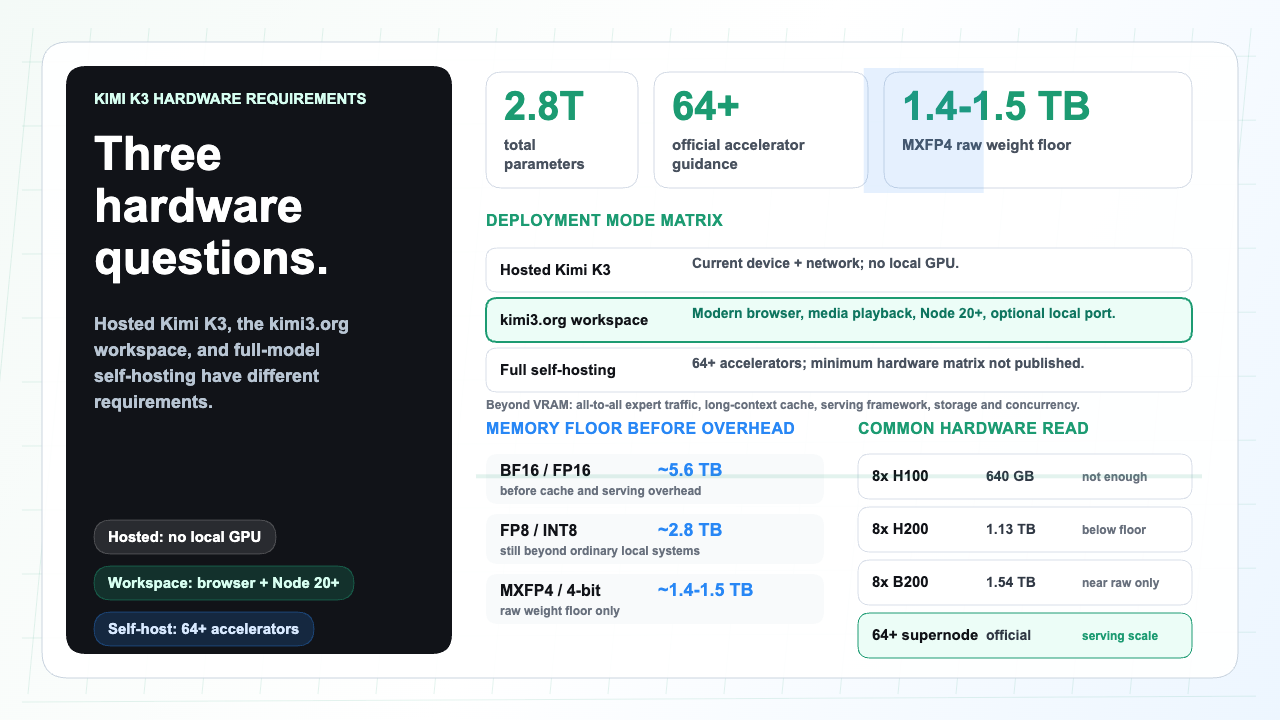
An RTX 6000 Ada has 48 GB of VRAM, which is useful for many local AI and workstation tasks. It is not enough by itself to run full Kimi K3 weights.
Use the card for smaller local models, image or data pipelines, or as part of a multi-GPU experiment. For Kimi K3 itself, hosted Kimi, Kimi Code, or a K3Nova workspace can be used without putting the model on the card.
Use this section to keep the next step practical before you touch accounts, files, infrastructure, or hardware.
| Check | Look for | Why it matters |
|---|---|---|
| Read the official source | Start with the model card, help center, docs, or official product page before trusting summaries. | Model names, limits, and prices change. |
| Name the path | Decide whether you need a hosted app, API call, local client, or full self-managed deployment. | Different paths have different costs and account boundaries. |
| Check the boundary | Keep login, payment, API keys, private files, and account settings on the official surface. | A public guide should help you choose, not handle sensitive actions. |
| Keep evidence | Save the source link, date, version, and practical next step that shaped your decision. | This makes later review easier for a team. |
| Use case | Fit | Reason |
|---|---|---|
| K3Nova web workspace | Good | No local Kimi K3 weights are loaded |
| Hosted Kimi K3 API client | Good | Inference runs remotely |
| Smaller local open model | Often good | 48 GB VRAM can fit many smaller models depending on precision |
| Full Kimi K3 self-host | No, not alone | Full weights and cache require cluster-scale memory |
If you are calling a hosted Kimi endpoint, the RTX 6000 Ada does not run Kimi K3. It only supports your local app, browser, or auxiliary workload.
Test prompts, tools, and data flow locally with a model that fits 48 GB, then switch the endpoint when Kimi K3 is available through a hosted or cluster path.
A 2.8T model requires aggregate memory far beyond one 48 GB GPU.
Self-host planning also needs host RAM, storage, interconnect, cooling, serving software, and monitoring.
Local prototyping, smaller open-weight models, image workflows, embeddings, data preparation, and evaluation harness work.
One RTX 6000 Ada cannot hold full Kimi K3 weights, even though MoE routing activates only part of the model per token.
Confirm quality on hosted Kimi K3 first. If self-hosting is required, rent or design a cluster after the workload is measured.
Not the full model by itself. Use it for smaller models or as part of a larger infrastructure plan.
No. K3Nova is a web workspace and does not need a local GPU for normal use.
Buy nothing until you have tested Kimi K3 quality through a hosted endpoint and measured your real workload.